Developer Guide
- Acknowledgements
- Setting up, getting started
- Design
- Implementation
- Documentation, logging, testing, configuration, dev-ops
- Appendix: Requirements
- Appendix: Instructions for manual testing
- Appendix: Planned Enhancements
- Appendix: Effort
Acknowledgements
- This project is built on top of AddressBook-Level3, and reuses the original architecture, application structure, and substantial parts of the command/parser/storage/UI foundation from that codebase.
- Our user and developer documentation structure was adapted from the AddressBook-Level3 project and the SE-EDU guides.
- Third-party libraries used include JavaFX, Jackson, JUnit 5, JaCoCo, Checkstyle, and PlantUML.
Setting up, getting started
Refer to the guide Setting up and getting started.
Design
 Tip: The
.puml files used to create diagrams are in this document docs/diagrams folder. Refer to the
PlantUML Tutorial at se-edu/guides to learn how to create
and edit diagrams.
Architecture
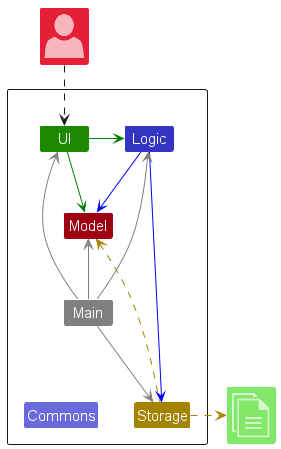
The Architecture Diagram given above explains the high-level design of the App.
Given below is a quick overview of main components and how they interact with each other.
Main components of the architecture
Main (consisting of classes
Main and
MainApp) is in
charge of the app launch and shut down.
- At app launch, it initializes the other components in the correct sequence, and connects them up with each other.
- At shut down, it shuts down the other components and invokes cleanup methods where necessary.
The bulk of the app’s work is done by the following four components:
-
UI: The UI of the App. -
Logic: The command executor. -
Model: Holds the data of the App in memory. -
Storage: Reads data from, and writes data to, the hard disk.
Commons represents a collection of classes used by multiple other components.
How the architecture components interact with each other
The Sequence Diagram below shows how the components interact with each other for the scenario where the user issues
the command delete 1.
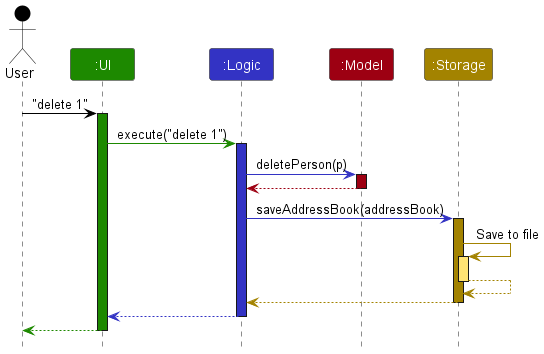
Each of the four main components (also shown in the diagram above),
- defines its API in an
interfacewith the same name as the Component. - implements its functionality using a concrete
{Component Name}Managerclass (which follows the corresponding APIinterfacementioned in the previous point.
For example, the Logic component defines its API in the Logic.java interface and implements its functionality using
the LogicManager.java class which follows the Logic interface. Other components interact with a given component
through its interface rather than the concrete class (reason: to prevent outside component’s being coupled to the
implementation of a component), as illustrated in the (partial) class diagram below.
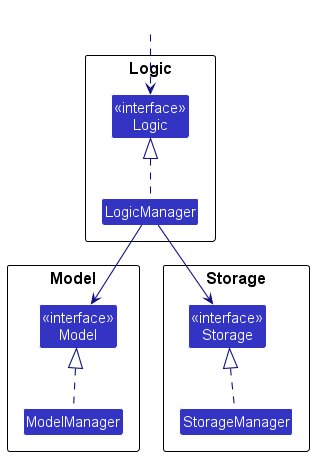
The sections below give more details of each component.
UI component
The API of this component is specified in
Ui.java
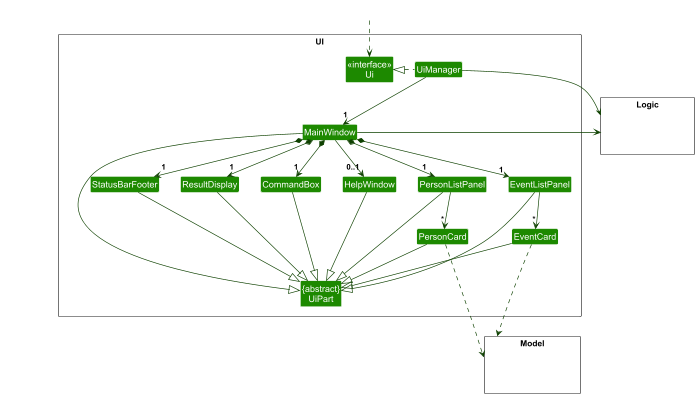
The UI consists of a MainWindow that is made up of parts e.g.CommandBox, ResultDisplay, PersonListPanel,
StatusBarFooter, EventListPanel, etc. All these, including the MainWindow, inherit from the abstract UiPart class which captures
the commonalities between classes that represent parts of the visible GUI.
The UI component uses the JavaFx UI framework. The layout of these UI parts are defined in matching .fxml files that
are in the src/main/resources/view folder. For example, the layout of the
MainWindow
is specified in
MainWindow.fxml
The UI component,
- executes user commands using the
Logiccomponent. - listens for changes to
Modeldata so that the UI can be updated with the modified data. - keeps a reference to the
Logiccomponent, because theUIrelies on theLogicto execute commands. - depends on some classes in the
Modelcomponent, as it displaysPersonobject residing in theModel.
Logic component
API :
Logic.java
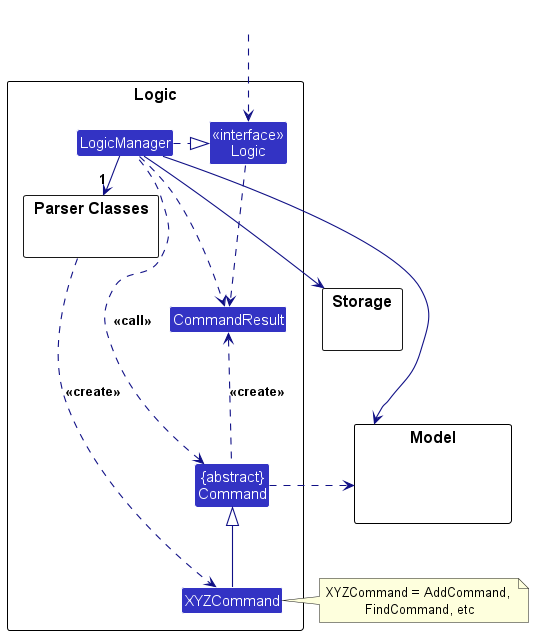
Here’s a (partial) class diagram of the Logic component:
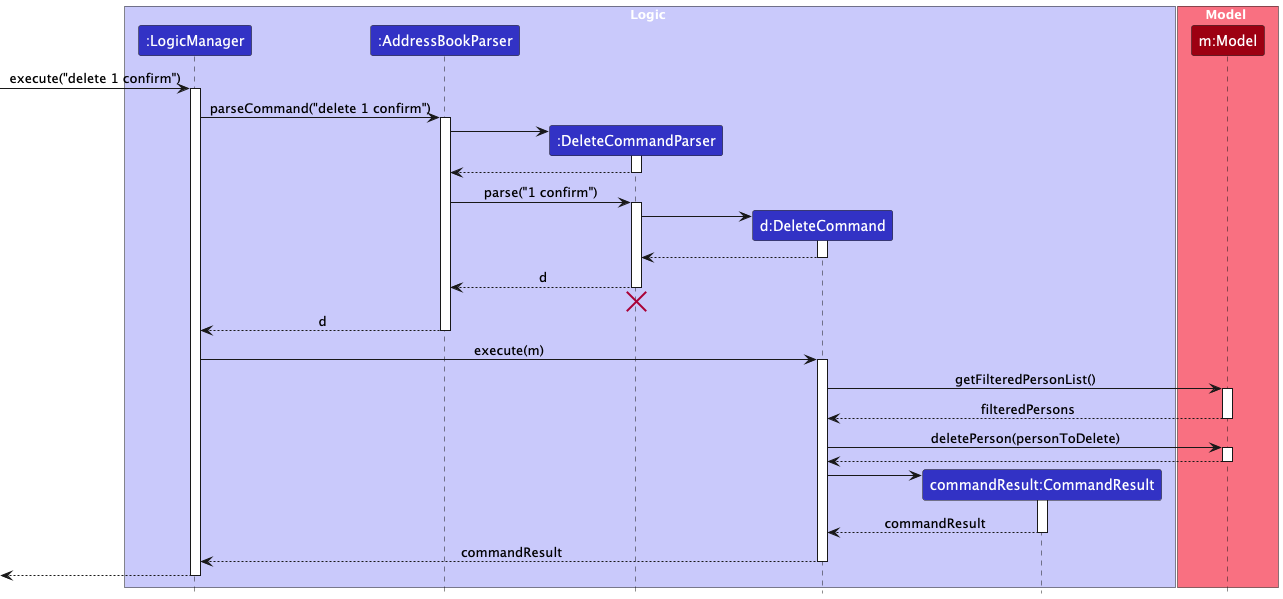
The sequence diagram below illustrates the interactions within the Logic component, taking
execute("delete 1 confirm") as an example. This is the confirmed follow-up command produced by the parser’s
multi-step delete interaction flow after the user first selects a player for deletion.
How the Logic component works:
- When
Logicis called upon to execute a command, it is passed to anAddressBookParserobject which in turn creates a parser that matches the command (e.g.,DeleteCommandParser) and uses it to parse the command. - This results in a
Commandobject (more precisely, an object of one of its subclasses e.g.,DeleteCommand) which is executed by theLogicManager. - The command can communicate with the
Modelwhen it is executed (e.g. to delete a person).
Note that although this is shown as a single step in the diagram above (for simplicity), in the code it can take several interactions (between the command object and theModel) to achieve. - The result of the command execution is encapsulated as a
CommandResultobject which is returned back fromLogic.
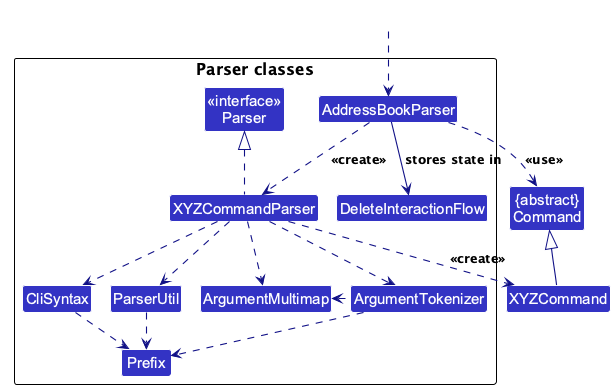
Here are the other classes in Logic (omitted from the class diagram above) that are used for parsing a user command:
How the parsing works:
- When called upon to parse a user command, the
AddressBookParserclass creates anXYZCommandParser(XYZis a placeholder for the specific command name e.g.,AddCommandParser) which uses the other classes shown above to parse the user command and create aXYZCommandobject (e.g.,AddCommand) which theAddressBookParserreturns back as aCommandobject. -
AddressBookParseralso keeps aDeleteInteractionFlowhelper to support multi-step follow-up inputs fordeleteanddeletebulk. This allows inputs such asy,n, or a clash-selection index to be rewritten into a concrete command before normal parsing continues. - All
XYZCommandParserclasses (e.g.,AddCommandParser,DeleteCommandParser, …) inherit from theParserinterface so that they can be treated similarly where possible e.g, during testing.
Model component
API :
Model.java
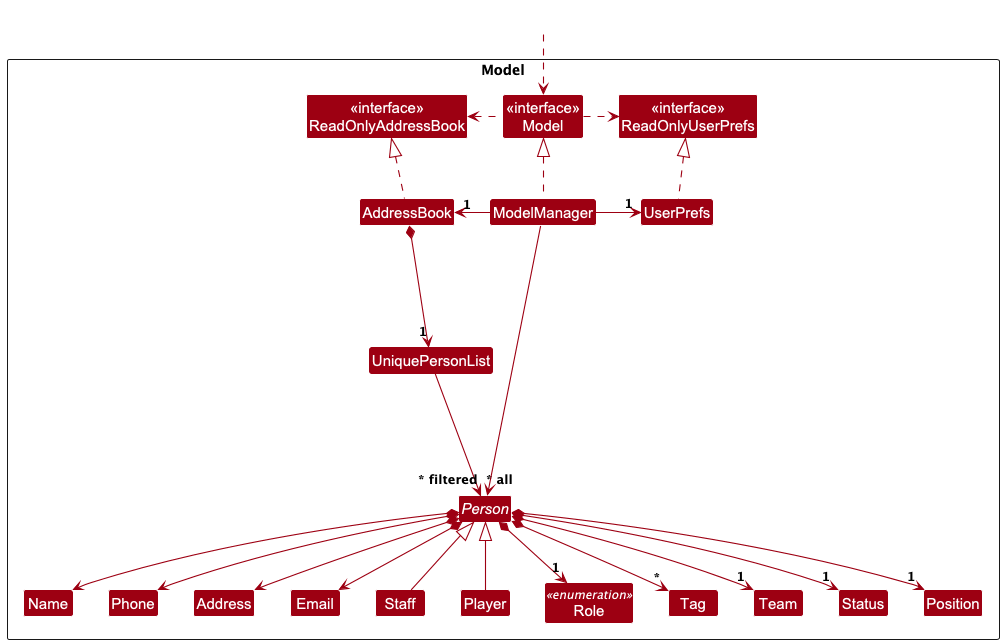
The Model component,
- stores the address book domain data, including
Personobjects,Eventobjects, and theTeam/Status/Positionattribute catalogs. -
Personis an abstract class that is extended byPlayerandStaffclasses. - stores the currently ‘selected’
Personobjects (e.g., results of a search query) as a separate filtered list which is exposed to outsiders as an unmodifiableObservableList<Person>that can be ‘observed’ e.g. the UI can be bound to this list so that the UI automatically updates when the data in the list change. - stores a
UserPrefobject that represents the user’s preferences. This is exposed to the outside as aReadOnlyUserPrefobjects. - does not depend on any of the other three components (as the
Modelrepresents data entities of the domain, they should make sense on their own without depending on other components)
The overview model diagrams in this section focus on the person-role structure and intentionally omit event and attribute-catalog details to keep the diagrams readable. Those details are documented later in the feature-specific implementation sections.
 Note: An alternative (arguably, a more OOP) model is given below. It has a
Tag list in the AddressBook, which Person references. This allows AddressBook to only require one Tag object per unique tag, instead of each Person needing their own Tag objects.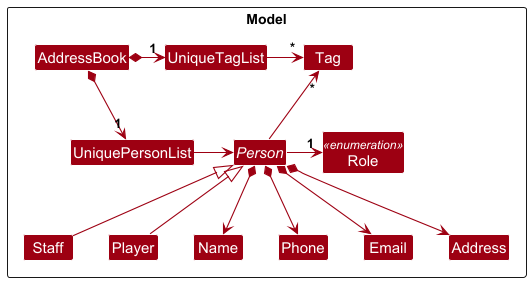
Storage component
API :
Storage.java
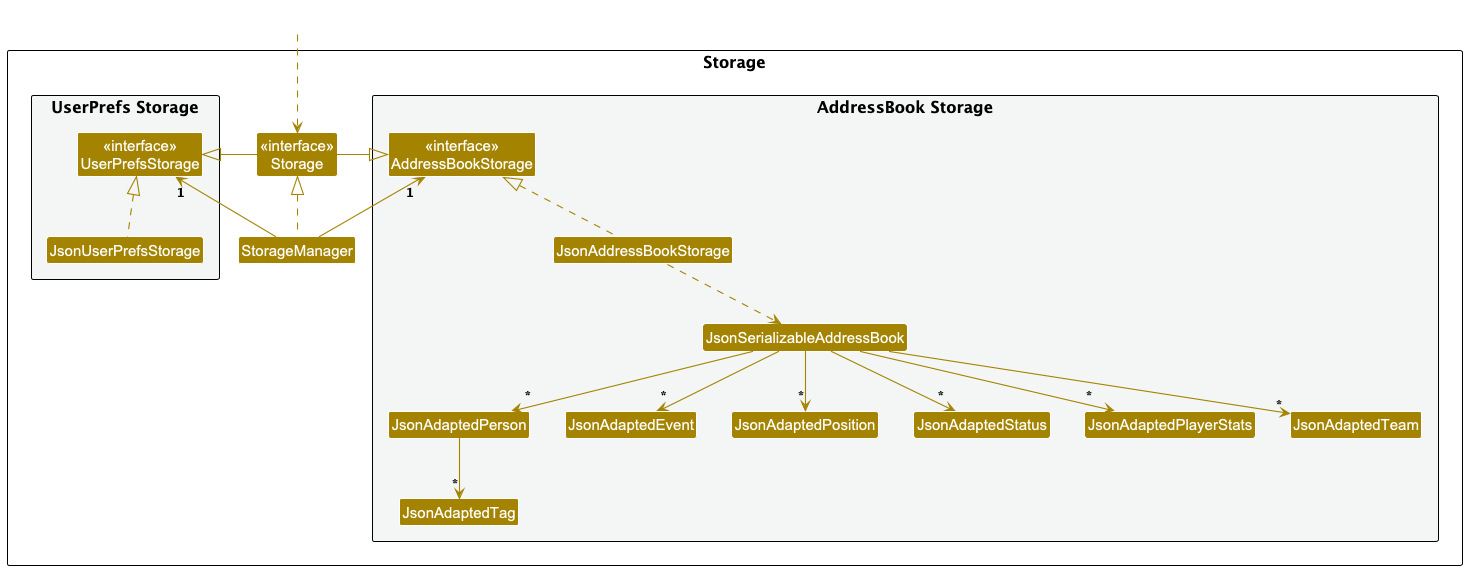
The Storage component,
- can save both address book data and user preference data in JSON format, and read them back into corresponding objects.
- inherits from both
AddressBookStorageandUserPrefStorage, which means it can be treated as either one (if only the functionality of only one is needed). - depends on some classes in the
Modelcomponent (because theStoragecomponent’s job is to save/retrieve objects that belong to theModel)
Common classes
Classes used by multiple components are in the seedu.address.commons package.
Implementation
This section describes some noteworthy details on how certain features are implemented.
Role-filtered list command
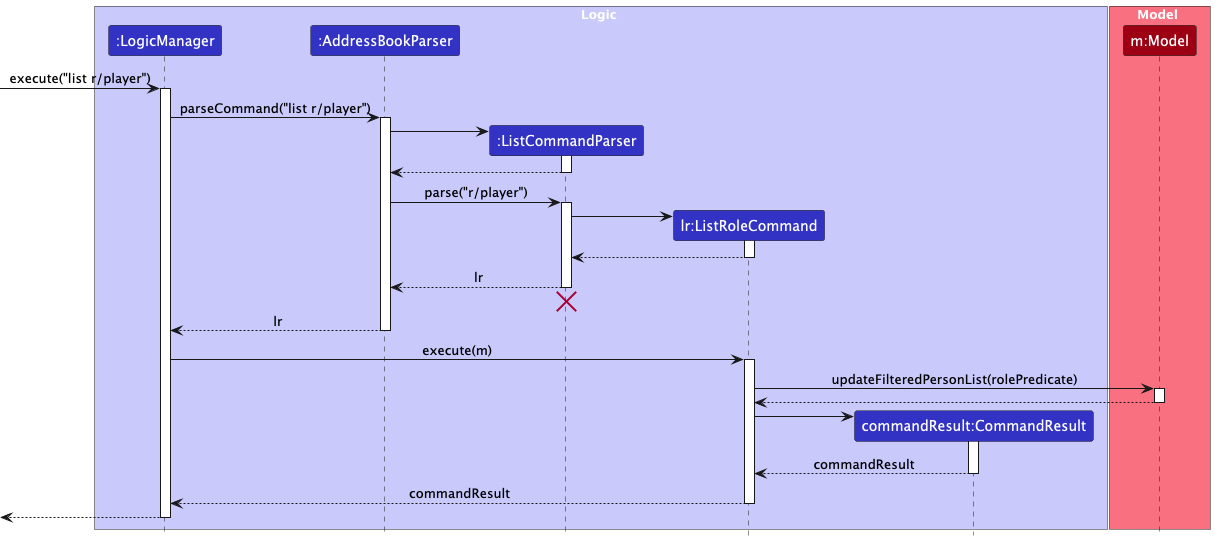
For role-filtered list input, AddressBookParser delegates to ListCommandParser.
A bare list command still returns ListCommand directly.
For role-only input such as list r/player or list r/staff,
ListCommandParser creates a ListRoleCommand with the corresponding role predicate.
When executed, ListRoleCommand calls Model#updateFilteredPersonList(...) with
PersonHasRolePredicate(Role.PLAYER) or PersonHasRolePredicate(Role.STAFF), which updates the
observable filtered list shown in the UI.
The sequence diagram below illustrates the interaction flow using execute("list r/player") as the example.
Structured filter command
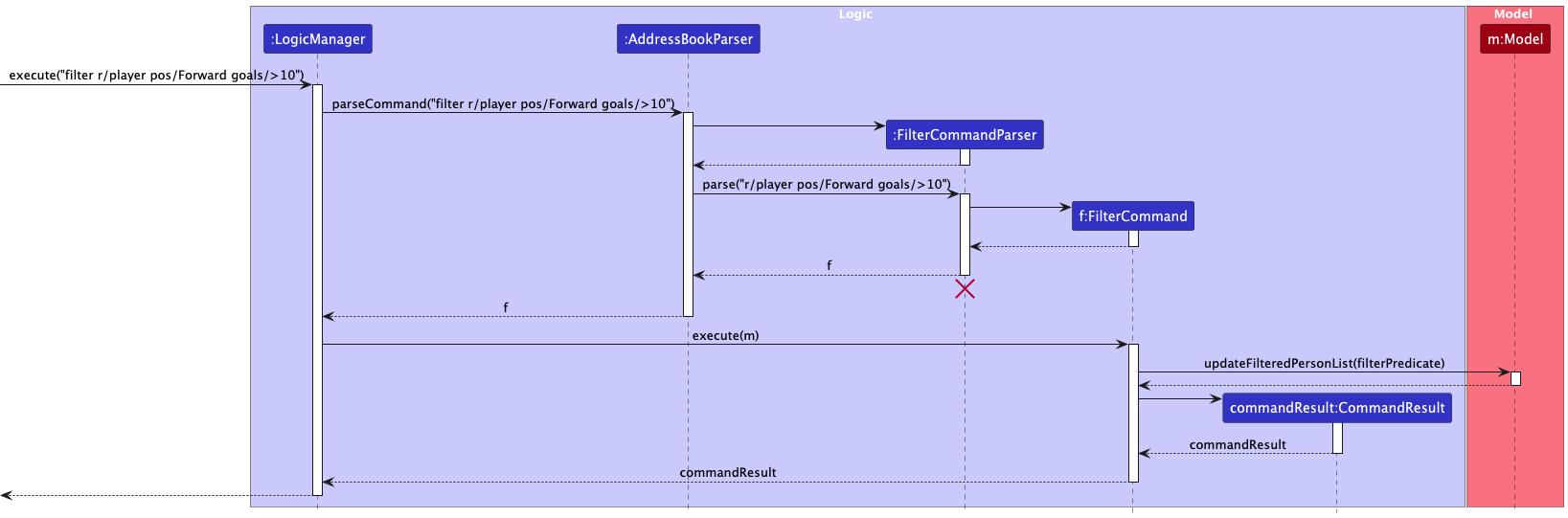
The filter command is implemented as a predicate-based list narrowing operation.
-
FilterCommandParserparses optional role, team, status, and position criteria, together with optional numeric comparisons forgoals,wins,losses, anddraws. - Parsed criteria are assembled into
PersonMatchesFilterPredicate, which combines all supplied filters with AND semantics. -
FilterCommandapplies that predicate throughModel#updateFilteredPersonList(...). - Stat comparisons only match players; non-player entries do not satisfy
goals,wins,losses, ordrawsfilters.
The following sequence diagram illustrates filter r/player pos/Forward goals/>10.
Attribute-filtered list command
For attribute-filtered input such as list tm/First Team or
list r/player st/Active pos/Defender, ListCommandParser creates a
ListFilteredCommand instead of a ListRoleCommand.
Implementation details:
-
ListCommandParsertokenizes the optionalr/,tm/,st/, andpos/prefixes. - If only
r/is present, it returnsListRoleCommandto preserve the simpler role-only flow. - If any attribute filter is present, it builds a
PersonMatchesListFiltersPredicatewith the provided optional role, team, status, and position values. -
ListFilteredCommandthen callsModel#updateFilteredPersonList(...)with that composite predicate, updating the observable filtered list shown in the UI.
The corresponding sequence-diagram source for the filtered path is recorded in
docs/diagrams/ListFilteredSequenceDiagram.puml.
Player Stats (and Calculated Stats)
Each player owns a PlayerStats object that contains the player’s performance stats. These stats can be modified by the user through commands.
- Each stat is a defined enum constant in
StatField, consisting of a defined getter, setter and validation function for each statFunction<PlayerStats, Integer> getterBiConsumer<PlayerStats, Integer> setterPredicate<Integer> validator
- To define a new player stat, simply define it as a new enum constant in
StatField, and link it with the corresponding getter/setter/validation functions inPlayerStats - This design is meant to be data-driven, so that the only modifications needed are minimal:
-
StatField: to define to new stat -
PlayerStats: to link getter/setter/validation functions, and updatecopy()/equals() -
SetCommand/UpdateCommand: to update usage message
-
- Other components such as JSON storage, UI, will reflect the new addition automatically and will work as intended.
Calculated stats:
As opposed to basic player stats, calculated stats are advanced player performance stats based on the existing stats of the player.
- These stats cannot be directly set/updated, but rather, once the player base stats change, these calculated stats are automatically updated by recalculating with respect to the new values.
- Therefore, these advanced stats are meant to be read-only.
- Just like basic player stats, new calculated stats can be defined by adding a new enum constant to
CalculatedStatField, with the relevant calculationFunction<PlayerStats, Double>.
Commands to modify player stats:
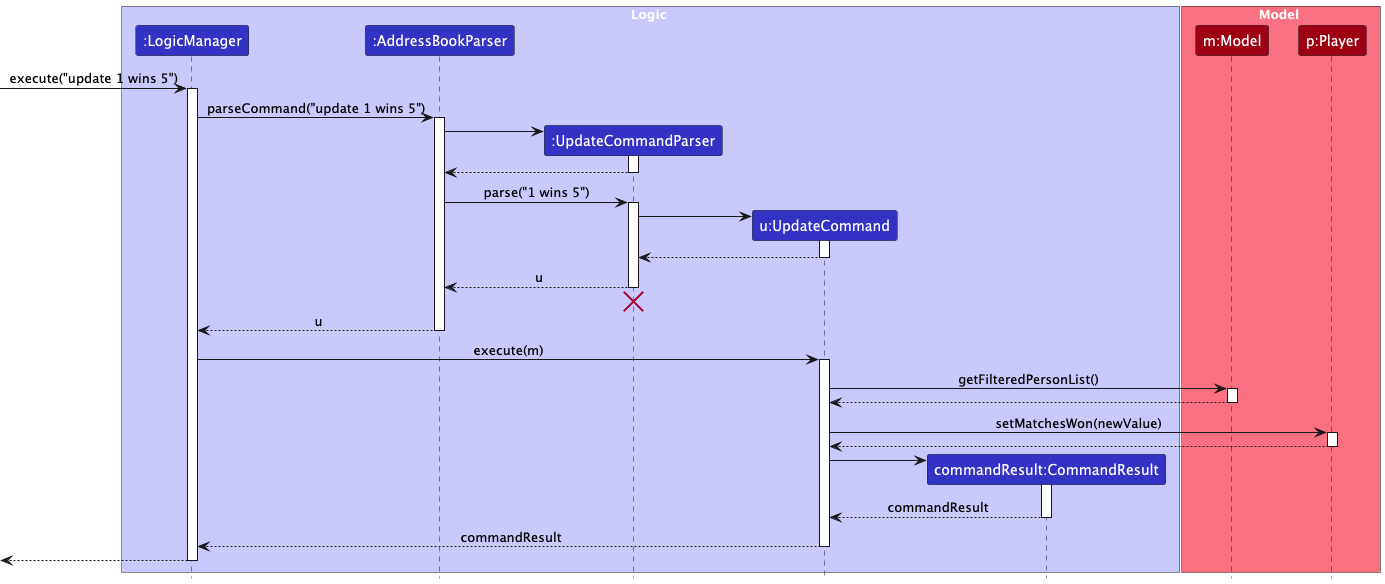
The update command (set command works similarly) is handled by the AddressBookParser via the UpdateCommandParser,
which creates a UpdateCommand with the given parameters (INDEX, STAT, VALUE).
The player stat is updated with the relevant setter function in PlayerStats.
The sequence diagram below illustrates the interactions, taking a execute("update 1 wins 5") call as an example.
Attributes catalog and assignment
The attributes feature introduces three catalog-backed value objects:
Team, Status, and Position.
At model level:
-
AddressBookstores separate unique catalogs (UniqueTeamList,UniqueStatusList,UniquePositionList) in addition to persons and events. -
Model/ModelManagerexpose catalog operations:has*,add*,set*,delete*, andget*List. -
PersonstoresTeam,Status, andPositionas immutable fields.
This part of the model intentionally favors explicit domain-specific classes over early generic abstractions. Although the three unique catalog lists are structurally similar, keeping them separate keeps the design easier to read, allows each catalog type to evolve independently, and avoids adding generic indirection before there is a clear need for shared behavior.
Default catalogs are seeded in SampleDataUtil:
- Team:
Unassigned Team,First Team,Second Team - Position:
Unassigned Position,Goalkeeper,Defender,Midfielder,Forward - Status:
Unknown,Active,Unavailable
Catalog command flow
AddressBookParser routes attribute catalog *add, *edit, and *delete commands to their
dedicated parsers. The three *list catalog commands are validated and created directly in
AddressBookParser because they do not take arguments:
- Team:
teamadd,teamedit,teamdelete,teamlist - Status:
statusadd,statusedit,statusdelete,statuslist - Position:
positionadd,positionedit,positiondelete,positionlist
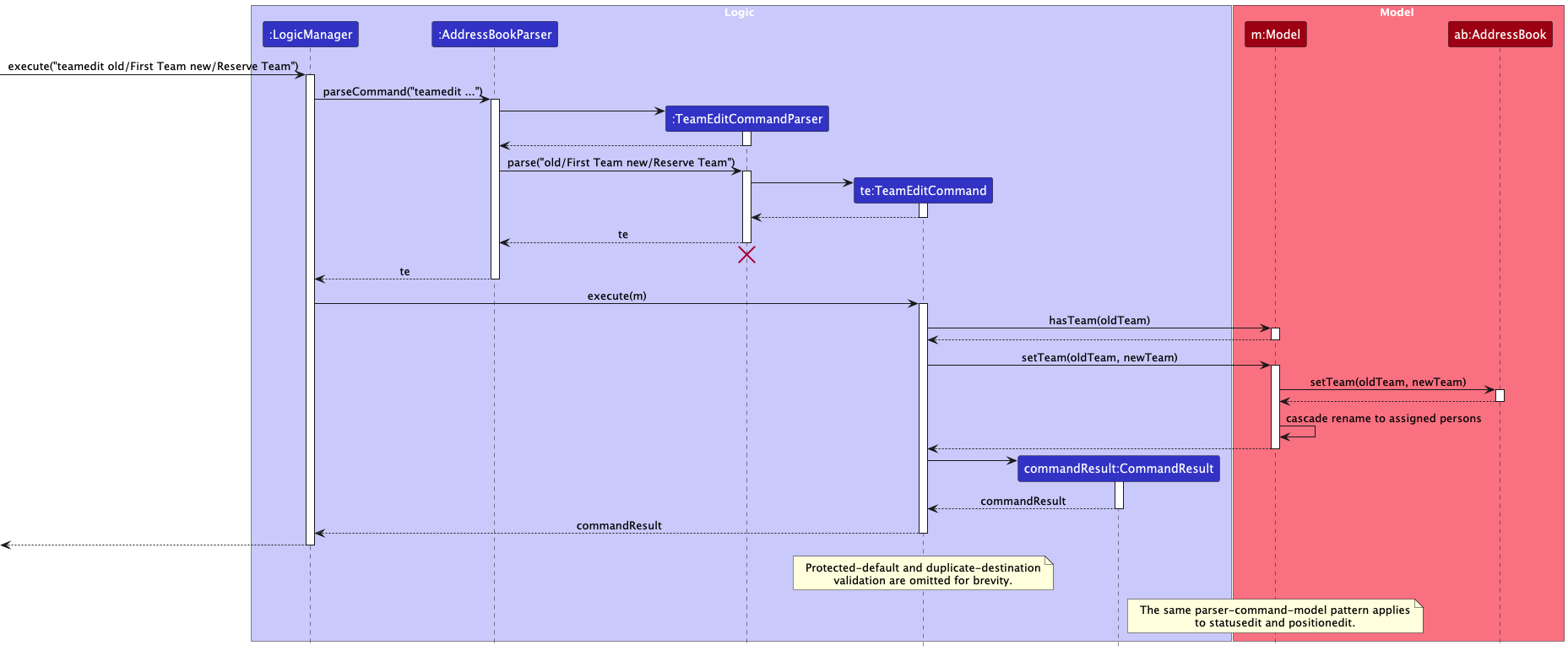
The sequence diagram below uses teamedit old/First Team new/Reserve Team as the representative
attribute catalog command flow. All attribute catalog commands share the same high-level
command-model pattern: *add inserts a catalog value, *delete removes one after guard
checks, *list formats the current catalog for display, and *edit renames a catalog value.
teamedit is shown because it is the richest representative case, while status* and position*
follow the same interaction structure with attribute-specific validation/messages.
Command behavior:
-
*addchecks duplicates before inserting. -
*editchecks target exists, rejects duplicate destination values, and blocks edits of protected defaults. -
*deletechecks target exists, blocks deletion of protected defaults, and blocks deletion if in use by any person. -
*listreturns numbered catalog output for display. - Catalog identity is case-insensitive (via attribute value equality), so matching/duplicate checks are case-insensitive.
- Case-only renames are supported (e.g.,
First Team->first team).
Protected default values:
- Team:
Unassigned Team - Position:
Unassigned Position - Status:
Unknown
Attribute assignment in person commands
add and edit support person attributes via prefixes:
-
tm/for team -
st/for status -
pos/for position
Validation and normalization:
- If provided, attribute values must exist in their catalogs.
- In
add, omitted values use defaults. - In
edit, omitted values keep the person’s existing attribute values, unless the resulting role becomesSTAFF, in which casepositionis normalized toUnassigned Position. - Input matching is case-insensitive through attribute value equality.
- Stored display casing follows the matched catalog entry’s exact casing.
- Position is player-only:
- in
add, staff cannot be assigned a non-default position. - in
edit, any providedpos/is rejected if the resulting role isSTAFF.
- in
Rename cascade behavior
When a catalog value is renamed (teamedit, statusedit, positionedit):
-
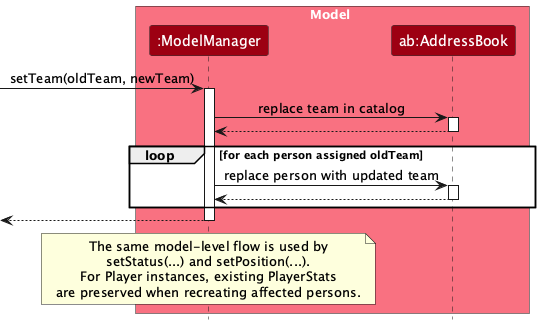
ModelManager#setTeam,setStatus, andsetPositionupdate the catalog entry. - The same operations then rebuild and replace all persons currently assigned the old value.
- For players, existing
PlayerStatsare preserved during rebuild.
The sequence diagram below focuses on the internal model-level rename cascade after command-level
validation has already succeeded. setTeam(...) is shown as the representative example, while the
internal replacement steps are intentionally shown in a simplified form to keep the diagram focused.
setStatus(...) and setPosition(...) follow the same model-level flow.
Batch Import
The importcsv command allows batch import of players/staff, with fields defined in each column.
The User Guide will have the latest expected format. The parser is strict and expect the CSV file to comply with the given format.
The CSV is custom, which allows behaviour such as escaped commas.
Parser behaviour is customizable by modifying CsvImportService/CsvImportResult.
Storage behavior
JsonSerializableAddressBook persists all three catalogs (teams, positions, statuses) and persons.
During load:
- malformed/duplicate catalog entries are skipped with warning logs,
- protected default catalog values are auto-healed if missing from JSON,
- person attribute fields (
team,status,position) are required inJsonAdaptedPerson, - malformed person rows are skipped with warning logs,
- valid person attributes missing from catalogs are auto-registered, and
- non-default
positionvalues forSTAFFare normalized toUnassigned Position.
UI behavior
PersonCard renders Team, Status, and Position labels only when the person has non-default values.
It also adds a red staff logo if the contact is a staff. If it is a player, the defined performance stats are displayed.
Delete and bulk-delete confirmation flow
The delete and deletebulk features use a parser-managed continuation flow so that follow-up inputs can stay short
for the user.
- For
delete, an initial command can identify a player by list index or by matching name keywords, preferably using the explicitn/prefix for name-based targets. - If the command is not yet confirmed,
DeleteInteractionFlowstores enough context to interpret the next input as either confirmation (y), cancellation (n), or a clash-selection index. - For index-based deletion, a follow-up
yis rewritten internally todelete INDEX confirm. - For criteria-based deletion, follow-up commands are normalized to the
delete n/NAME ...form so names likeY,N, or2are preserved as literal name targets. - For bulk deletion, a follow-up
yornis rewritten internally todeletebulk y [t/TAG | tm/TEAM | st/STATUS]ordeletebulk n [t/TAG | tm/TEAM | st/STATUS], preserving whichever criterion was originally used.
The sequence diagram below shows the confirmed index-based delete path after the follow-up input has been rewritten into
delete 1 confirm.
Sorting filtered lists
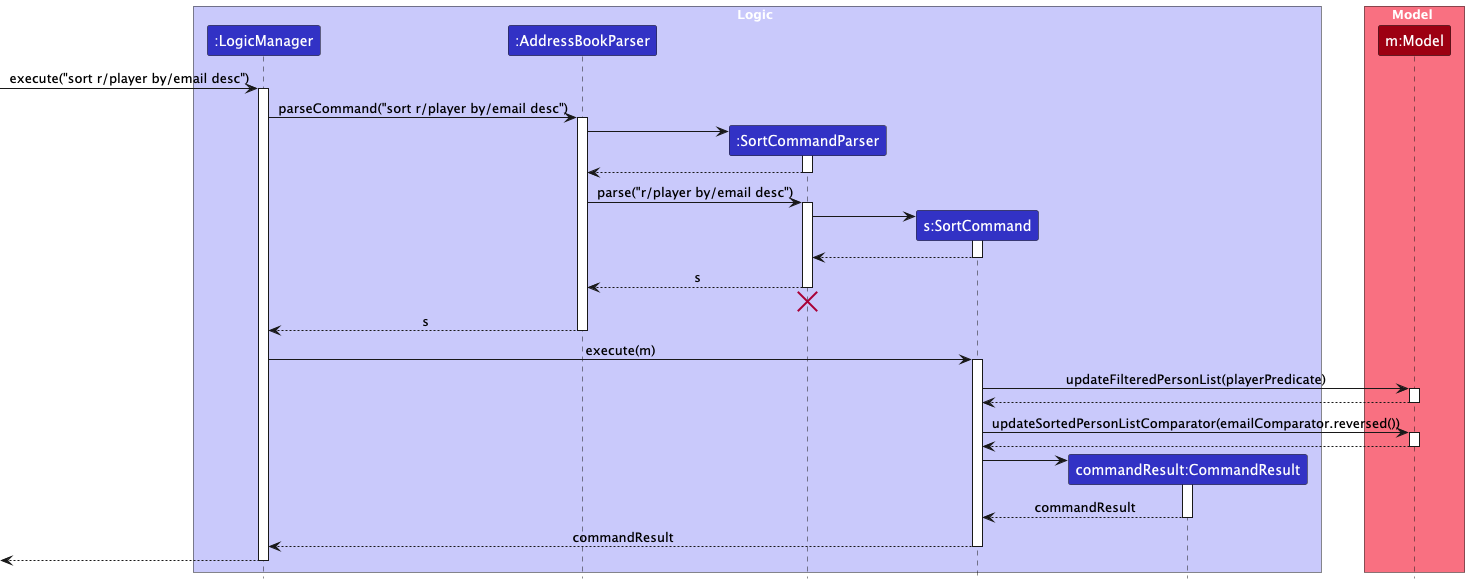
sort is implemented as a Logic-to-Model operation that first sets the target scope and then applies a comparator
to the filtered person list.
-
SortCommandParserparses the scope (r/player,r/staff, or all persons), theby/...attribute (name,email,team,status,position,goals,wins,losses, ordraws), and the optionaldescmodifier. -
PersonSortAttributecentralizes the comparator for each supported sort key so parser validation and runtime ordering stay aligned. - Attribute-based comparators use case-insensitive ordering with name-based tie-breaking for predictable output.
- Stat-based comparators read from
PlayerStats; when the requested attribute isgoals,wins, orlosses,SortCommandswitches the visible list to players before applying the comparator. -
SortCommandupdates the filtered list predicate before applying the selected comparator inModelManager. -
ModelManagerexposes the result through aSortedList<Person>, so the UI observes the sorted order directly.
The following sequence diagram illustrates sort r/player by/email desc.
Documentation, logging, testing, configuration, dev-ops
Appendix: Requirements
Product scope
Target user profile:
- is a soccer academy manager
- oversees multiple competition and recreational teams
- managing players and staff with varying roles, strengths, and statuses
- struggles to recall individual details amid daily tasks
- prefer desktop apps over other types
- can type fast
- prefers typing to mouse interactions
- is reasonably comfortable using CLI apps
Value proposition: This tool enables efficient management of players, staff, and teams by centralizing key information, allowing quick access to essential details and status updates across competition and recreational groups, freeing the manager from manual memory tracking to focus on strategies and decisions.
User stories
Priorities: High (must have) - * * *, Medium (nice to have) - * *, Low (unlikely to have) - *
| Priority | As a … | I want to … | So that… |
|---|---|---|---|
* * |
soccer academy manager | launch the app with sample data | I can quickly understand how player, staff, and event records are shown |
* * |
soccer academy manager | read the user guide | I can learn the command format before managing live data |
* * * |
soccer academy manager | add new players to the app | I can keep the squad list up to date |
* * * |
soccer academy manager | delete players or staff from the app | I can remove incorrect or outdated records |
* * * |
soccer coach | view only players or only staff | I can focus on the group relevant to the task at hand |
* * * |
team administrator | add matches and training sessions to the app | I can maintain an accurate schedule of team events |
* * * |
team administrator | edit and delete matches and training sessions | I can correct scheduling mistakes |
* * |
soccer coach | quickly retrieve and view player stats | I can assess player performance before making decisions |
* |
soccer academy manager | bulk delete players based on a shared tag | I can clean up records efficiently |
* * |
soccer academy manager | assign attributes to each player | I can organize players by team, status, or position |
* * |
soccer coach | filter players based on tags or attributes | I can review the exact group I need for training or match preparation |
* |
soccer coach | track attendance for training sessions | I can identify players who missed training |
* * |
team administrator | search within the staff or player list | I can find a specific staff member or player quickly |
* * |
team administrator | edit staff or player information | I can keep roster records accurate over time |
* * |
soccer coach | filter players based on specific stats or traits | I can identify players who meet performance criteria |
* * |
team administrator | import a new batch of players using a CSV file | I can update the roster efficiently |
* * |
soccer coach | record simple player stats such as goals, wins, and losses | I can review basic performance indicators |
* * |
soccer coach | view advanced player stats such as win rate or average goals per match | I can evaluate players in more detail |
Use cases
(For all use cases below, the System is the SoCcer Manager and the Actor is the manager, unless specified
otherwise)
Use case: UC00 - Add new person MSS
- Manager requests to add a person.
- Manager provides person details, including optional attribute values.
- SoCcer Manager adds the person.
- SoCcer Manager informs the manager that the person was added.
Use case ends.
Extensions
- 2a. Invalid person details (e.g., invalid name/phone/email/address).
- 2a1. SoCcer Manager informs the manager that the person was not added.
Use case resumes at step 2.
- 2a1. SoCcer Manager informs the manager that the person was not added.
- 2b. At least one optional provided attribute does not exist in the corresponding catalog.
- 2b1. SoCcer Manager informs the manager that the person was not added.
Use case resumes at step 2.
- 2b1. SoCcer Manager informs the manager that the person was not added.
- 2c. Manager assigns a non-default position to a staff member.
- 2c1. SoCcer Manager informs the manager that the person was not added.
Use case resumes at step 2.
- 2c1. SoCcer Manager informs the manager that the person was not added.
- 2d. Manager provides details that match an existing person.
- 2d1. SoCcer Manager informs the manager that the person was not added.
Use case resumes at step 2.
- 2d1. SoCcer Manager informs the manager that the person was not added.
Use case: UC01 - Rename an attribute catalog value MSS
- Manager requests to rename an attribute catalog value.
- Manager provides the existing value and the replacement value.
- SoCcer Manager renames the catalog value.
- SoCcer Manager updates all persons currently assigned the original value.
- SoCcer Manager informs the manager that the catalog value was renamed.
Use case ends.
Extensions
- 2a. Existing value does not exist in the catalog.
- 2a1. SoCcer Manager informs the manager that the catalog value was not renamed.
Use case ends.
- 2a1. SoCcer Manager informs the manager that the catalog value was not renamed.
- 2b. Replacement value duplicates an existing catalog value.
- 2b1. SoCcer Manager informs the manager that the catalog value was not renamed.
Use case ends.
- 2b1. SoCcer Manager informs the manager that the catalog value was not renamed.
- 2c. Manager attempts to rename a protected default value.
- 2c1. SoCcer Manager informs the manager that the catalog value was not renamed.
Use case ends.
- 2c1. SoCcer Manager informs the manager that the catalog value was not renamed.
Use case: UC02 - Delete an attribute catalog value MSS
- Manager requests to delete an attribute catalog value.
- Manager specifies the catalog value to delete.
- SoCcer Manager deletes the catalog value.
- SoCcer Manager informs the manager that the catalog value was deleted.
Use case ends.
Extensions
- 2a. Specified value does not exist in the catalog.
- 2a1. SoCcer Manager informs the manager that the catalog value was not deleted.
Use case ends.
- 2a1. SoCcer Manager informs the manager that the catalog value was not deleted.
- 2b. Manager attempts to delete a protected default value.
- 2b1. SoCcer Manager informs the manager that the catalog value was not deleted.
Use case ends.
- 2b1. SoCcer Manager informs the manager that the catalog value was not deleted.
- 2c. Specified value is currently assigned to one or more persons.
- 2c1. SoCcer Manager informs the manager that the catalog value was not deleted.
Use case ends.
- 2c1. SoCcer Manager informs the manager that the catalog value was not deleted.
Use case: UC03 - Edit person attributes MSS
- Manager requests to edit a person.
- Manager identifies the person to edit and provides one or more updated attribute values.
- SoCcer Manager updates the person’s attributes.
- SoCcer Manager informs the manager that the person was updated.
Use case ends.
Extensions
- 2a. Manager specifies an invalid person.
- 2a1. SoCcer Manager informs the manager that the person was not updated.
Use case ends.
- 2a1. SoCcer Manager informs the manager that the person was not updated.
- 2b. Manager provides an attribute value that cannot be used for that person.
- 2b1. SoCcer Manager informs the manager that the person was not updated.
Use case ends.
- 2b1. SoCcer Manager informs the manager that the person was not updated.
Use case: UC04 - View persons by role MSS
- Manager requests to list persons by role.
- Manager provides the target role to filter by.
- SoCcer Manager shows persons with the requested role.
- SoCcer Manager shows the resulting list. Use case ends.
Extensions
- 2a. Manager provides role keyword in mixed/upper case.
- 2a1. SoCcer Manager treats role keyword case-insensitively.
Use case resumes at step 3.
- 2a1. SoCcer Manager treats role keyword case-insensitively.
- 2b. Manager provides an unsupported role keyword.
- 2b1. SoCcer Manager informs the manager that the list was not changed.
Use case ends.
- 2b1. SoCcer Manager informs the manager that the list was not changed.
Use case: UC05 - Filter persons using structured criteria MSS
- Manager requests to filter persons.
- Manager provides one or more structured criteria.
- SoCcer Manager applies the provided criteria.
- SoCcer Manager shows the matching persons. Use case ends.
Extensions
- 2a. Manager provides role, team, status, or position criteria.
- 2a1. SoCcer Manager applies exact-match filtering for the provided attributes.
Use case resumes at step 3.
- 2a1. SoCcer Manager applies exact-match filtering for the provided attributes.
- 2b. Manager provides stat comparison criteria for
goals,wins,losses, ordraws.- 2b1. SoCcer Manager applies numeric comparison filtering for player stats.
Use case resumes at step 3.
- 2b1. SoCcer Manager applies numeric comparison filtering for player stats.
- 2c. Manager provides an invalid role, attribute value, or malformed stat comparison.
- 2c1. SoCcer Manager shows an error message. Use case ends.
- 3a. No persons match the provided criteria.
- 3a1. SoCcer Manager shows an empty result. Use case ends.
Use case: UC06 - Sort persons by attribute or stat MSS
- Manager requests to sort persons.
- Manager provides an optional role scope, a supported sort attribute, and an optional sort order.
- SoCcer Manager applies the requested scope, if any.
- SoCcer Manager sorts the relevant persons by the requested attribute.
- SoCcer Manager shows the sorted list. Use case ends.
Extensions
- 2a. Manager omits the role scope.
- 2a1. For roster attributes, SoCcer Manager sorts the displayed list.
Use case resumes at step 4.
- 2a1. For roster attributes, SoCcer Manager sorts the displayed list.
- 2b. Manager specifies descending order.
- 2b1. SoCcer Manager sorts in descending order.
Use case resumes at step 4.
- 2b1. SoCcer Manager sorts in descending order.
- 2c. Manager provides an unsupported sort attribute.
- 2c1. SoCcer Manager shows an error message. Use case ends.
- 5a. Manager sorts by
goals,wins,losses, ordraws.- 5a1. SoCcer Manager switches to the player-only list before applying the sort. Use case resumes at step 5.
- 4b. Manager attempts
sort r/staff by/goals,sort r/staff by/wins,sort r/staff by/losses, orsort r/staff by/draws.- 4b1. SoCcer Manager shows an error message. Use case ends.
Use case: UC07 - Bulk delete persons by shared criterion MSS
- Manager requests to bulk delete persons.
- Manager provides exactly one supported criterion:
tag,team, orstatus. - SoCcer Manager shows the persons matching the criterion.
- SoCcer Manager requests confirmation.
- Manager confirms the bulk deletion.
- SoCcer Manager deletes all matching persons.
- SoCcer Manager shows a success message. Use case ends.
Extensions
- 2a. Manager provides an unsupported or malformed criterion.
- 2a1. SoCcer Manager shows an error message. Use case ends.
- 3a. No persons match the provided criterion.
- 3a1. SoCcer Manager shows an error message. Use case ends.
- 5a. Manager provides a confirmation response other than
yorn.- 5a1. SoCcer Manager shows an error message. Use case ends.
Use case: UC08 - List persons using attribute filters MSS
- Manager requests to list persons using filters.
- Manager provides zero or more of the following filters: role, team, status, and position.
- SoCcer Manager applies all specified filters.
- SoCcer Manager shows the filtered list. Use case ends.
Extensions
- 2a. Manager omits all filters.
- 2a1. SoCcer Manager shows all persons.
Use case ends.
- 2a1. SoCcer Manager shows all persons.
- 2b. Manager provides only a role filter.
- 2b1. SoCcer Manager shows persons with the requested role. Use case resumes at step 4.
- 2c. Manager provides an invalid role or malformed filter input.
- 2c1. SoCcer Manager shows an error message. Use case ends.
- 3a. No persons match the provided filters.
- 3a1. SoCcer Manager shows an empty result. Use case ends.
Use case: UC09 - Set or update a player’s recorded performance stat MSS
- Manager requests to modify a player’s recorded performance stat.
- Manager specifies the displayed player index, the stat field, and the new value or increment value.
- SoCcer Manager validates the index and stat request.
- SoCcer Manager checks that the specified person is a player.
- SoCcer Manager validates that the resulting stat value satisfies the stat constraints.
- SoCcer Manager updates the player’s stat.
- SoCcer Manager refreshes the player details shown in the UI, including any calculated stats derived from the updated values.
- SoCcer Manager shows a success message.
Use case ends.
Extensions
- 3a. Manager specifies an invalid displayed index, stat field, or value.
- 3a1. SoCcer Manager shows an error message. Use case ends.
- 3b. Specified person is not a player.
- 3b1. SoCcer Manager shows an error message. Use case ends.
- 2a. Manager uses
set.- 2a1. SoCcer Manager replaces the stat with the specified value. Use case resumes at step 4.
- 2b. Manager uses
update.- 2b1. SoCcer Manager increments the stat by the specified value. Use case resumes at step 4.
Use case: UC10 - Automatically display calculated stats for a player MSS
- Manager views the player list or player details.
- SoCcer Manager retrieves each player’s recorded stats.
- SoCcer Manager computes the calculated stats for each player.
- SoCcer Manager displays the calculated stats. Use case ends.
Extensions
- 2a. Person shown is not a player.
- 2a1. SoCcer Manager does not display player statistics for that person. Use case ends.
- 3a. A calculated stat depends on the number of games played, but the player has played zero games.
- 3a1. SoCcer Manager avoids division by zero and displays the default calculated value. Use case resumes at step 4.
Use case: UC11 - Batch import persons from a CSV file MSS
- Manager requests to batch import persons from a CSV file.
- Manager provides a CSV file.
- SoCcer Manager checks whether the file format is supported.
- SoCcer Manager imports each valid row as a person.
- SoCcer Manager skips invalid rows and records the reason for each skipped row.
- SoCcer Manager shows a summary of imported and skipped rows. Use case ends.
Extensions
- 2a. Manager does not provide a CSV file.
- 2a1. SoCcer Manager aborts the import. Use case ends.
- 3a. CSV file has missing or unexpected fields in the header.
- 3a1. SoCcer Manager shows an error message. Use case ends.
- 4a. A row contains invalid person data.
- 4a1. SoCcer Manager skips the row and records the failure reason. Use case resumes at step 4.
- 4b. A row duplicates an existing person or another valid row in the same import.
- 4b1. SoCcer Manager skips the row and records the failure reason. Use case resumes at step 4.
- 6a. No valid rows are imported.
- 6a1. SoCcer Manager shows a summary indicating that all rows were skipped. Use case ends.
Use case: UC12 - Add new training MSS
- Manager wants to record a new training session.
- Manager provides the name of the training session, date, and players that attended the training.
- SoCcer Manager checks that the players exist in the address book.
- SoCcer Manager adds the training session with the specified name, date, and players. Use case ends.
Extensions
- 2a. Manager provides an attribute.
- 2a1. SoCcer Manager checks that the attribute exists.
- 2a2. SoCcer Manager gets a list of all the players with the specified attribute. Use case resumes at step 4.
- 2a1. SoCcer Manager checks that the attribute exists.
Non-Functional Requirements
- Should work on any mainstream OS as long as it has Java
17or above installed. - Should be able to hold up to 1000 players, 50 teams/groups, and multiple tags per player without noticeable performance degradation.
- A user with above average typing speed for regular English text (i.e. not code, not system admin commands) should be able to accomplish most of the tasks faster using commands than using the mouse.
- All standard commands (add, delete, list, filter, edit) should execute within 200 ms for up to 1000 players on a typical laptop.
- All successful modifying commands should automatically save data to prevent loss of information.
- The application should prevent data corruption and handle unexpected shutdowns safely.
- The system should provide clear and actionable error messages when invalid input is entered.
- The application should not crash during normal usage and should handle invalid inputs gracefully.
- The codebase should be modular and structured to allow new features (e.g., attendance or finance tracking) to be added without major refactoring.
Glossary
- Mainstream OS: Windows, Linux, Unix, MacOS
- Academy: The full set of staff/players used to represent all contacts in the contact list
- Attribute: A catalog-backed categorisation assigned to a person, such as Team, Status, or Position
- Attribute catalog: The approved set of values for an attribute. A Team, Status, or Position value must exist in its catalog before it can be assigned to a person
- Confirmation flow: A multi-step interaction that requires the manager to confirm or cancel an operation before it takes effect
- Event: A scheduled match or training session managed by the system
-
Filtered list: The currently displayed subset of persons produced by commands such as
list,filter, orfind - Position: The roles that each player is specialised/assigned in the team
- Performance Stats: The player statistics based on their previous games (e.g. goals, wins, losses, calculated winrate, etc.)
Appendix: Instructions for manual testing
Given below are instructions to test the app manually.
Note: These instructions only provide a starting point for testers to work on;
testers are expected to do more exploratory testing.
Launch and shutdown
-
Initial launch
-
Download the jar file and copy it into an empty folder.
-
Double-click the jar file.
Expected: Shows the GUI with a set of sample contacts. The window size may not be optimum.
-
-
Saving window preferences
-
Resize the window to an optimum size. Move the window to a different location. Close the window.
-
Re-launch the app by double-clicking the jar file.
Expected: The most recent window size and location is retained.
-
Deleting a person
-
Deleting a person while all persons are being shown
-
Prerequisites: List all persons using the
listcommand. Ensure multiple persons are in the list. -
Test case:
delete 1
Expected: The first contact is selected for deletion and a confirmation prompt is shown. No person is deleted yet. The status bar timestamp is not updated. -
Test case:
delete 0
Expected: No person is deleted immediately. If a person with the literal name0exists, that person is selected for deletion and a confirmation prompt is shown. Otherwise, an error message reports that no persons match0. Status bar remains the same. -
Test case:
delete 1, theny
Expected: The first contact is deleted from the list. Details of the deleted contact are shown in the status message. Timestamp in the status bar is updated. -
Other incorrect delete commands to try:
delete,delete x,...(where x is larger than the list size)
Expected: Similar to previous.
-
Attributes (catalog + assignment)
-
Managing catalogs with default protections
-
Prerequisites: Fresh app state with default catalogs loaded.
-
Test case:
teamlist
Expected: IncludesUnassigned Team,First Team,Second Team. -
Test case:
teamdelete Unassigned Team
Expected: Rejected with a message indicating default team cannot be deleted. -
Test case:
statusedit old/Unknown new/Available
Expected: Rejected with a message indicating default status cannot be edited. -
Test case:
positionadd Wingerthenpositiondelete Winger
Expected: Add succeeds, then delete succeeds. -
Test case:
teamedit old/First Team new/first team
Expected: Command succeeds (case-only rename is accepted).
-
-
In-use delete guards
-
Prerequisites: At least one person assigned
tm/First Team. -
Test case:
teamdelete First Team
Expected: Rejected because the catalog value is in use by persons.
-
-
Person assignment and validation
-
Test case:
add n/Test Player r/player p/90000001 e/testp@example.com a/Test Addr tm/first team st/active pos/forward
Expected: Command succeeds and displayed person shows canonical casing (First Team,Active,Forward). -
Test case:
add n/Test Staff r/staff p/90000002 e/tests@example.com a/Test Addr pos/Forward
Expected: Rejected because staff cannot be assigned non-default position. -
Test case:
edit 1 tm/nonexistent
Expected: Rejected because attribute value is not present in catalog.
-
-
Rename cascade to assigned persons
-
Prerequisites: At least one person currently assigned
tm/Second Team. -
Test case:
teamedit old/Second Team new/Reserve Team
Expected: Command succeeds and all persons previously assignedSecond Teamnow displayReserve Team.
-
Player Stats
- Updating player stats with
update- Prerequisites: At least one player in the list.
- Test case:
update 1 wins 5
Expected: Win count of player at index 1 increases by 5. Success message shows old and new value with increment. - Test case:
update 1 losses -1
Expected: Rejected if resulting value would go below 0. Error message indicates value must be more or equal to 0. - Test case:
update 1 invalidstat 5
Expected: Rejected with invalid command format message. - Test case:
update 0 wins 5
Expected: Rejected with invalid index message. - Test case:
update 2 goals 10where index 2 has a staff role
Expected: Rejected with error message indicating this person must be a player.
- Setting player stats with
set- Prerequisites: At least one player in the list.
- Test case:
set 1 goals 10
Expected: Goals of player at index 1 is set to exactly 10 regardless of previous value. Success message shows old and new value. - Test case:
set 1 draws 0
Expected: Draws set to 0. Valid since 0 is within the allowed range. - Test case:
set 1 wins -1
Expected: Rejected with error message indicating value must be more or equal to 0. - Test case:
set 2 goals 10where index 2 is a staff member
Expected: Rejected with error message indicating this person must be a player.
- Calculated stats display
- Prerequisites: A player with 0 wins, 0 losses, 0 draws.
- Test case: Observe win rate and goals per game displayed
Expected: Both show 0.00 (no division by zero error). - Test case:
set 1 wins 3thenset 1 losses 1
Expected: Win rate updates live to 75.00%. Goals per game updates accordingly.
Role-scoped list
-
Listing persons by role
-
Prerequisites: At least one player and one staff in the current address book.
-
Test case:
list r/player
Expected: Only players are shown. Status message indicates players were listed. -
Test case:
list r/staff
Expected: Only staff are shown. Status message indicates staff were listed. -
Test case:
list r/PLAYER
Expected: Same result aslist r/player(role keyword is case-insensitive). -
Test case:
list r/coaches
Expected: Command is rejected with an invalid format message. Filtered list is unchanged.
-
Structured filter
-
Filtering persons with structured criteria
-
Prerequisites: The address book contains players/staff with a mix of roles, attributes, and stats.
-
Test case:
filter r/player
Expected: Only players are shown. -
Test case:
filter tm/First Team st/Active
Expected: Only persons matching both criteria are shown. -
Test case:
filter pos/Forward goals/>10
Expected: Only forwards with more than 10 goals are shown. -
Test case:
filter wins/<3
Expected: Only players with fewer than 3 wins are shown. Staff do not match this stat filter. -
Test case:
filter draws/=2
Expected: Only players with exactly 2 draws are shown. Staff do not match this stat filter. -
Test case:
filter goals/10
Expected: Command is rejected with an invalid format message. -
Test case:
filter tm/Nonexistent Team
Expected: Command is rejected because the team does not exist in the catalog. Filtered list is unchanged. -
Test case:
filter st/Retired
Expected: Command is rejected because the status does not exist in the catalog. Filtered list is unchanged. -
Test case:
filter pos/Coach
Expected: Command is rejected because the position does not exist in the catalog. Filtered list is unchanged.
-
-
Listing persons with attribute filters
-
Prerequisites: At least one player assigned
tm/First Team,st/Active, andpos/Defender. -
Test case:
list tm/First Team
Expected: Only persons assignedFirst Teamare shown. Status message indicates matching team filter. -
Test case:
list st/Active pos/Defender
Expected: Only persons matching both status and position filters are shown. -
Test case:
list r/player tm/First Team st/Active pos/Defender
Expected: Only players matching all specified filters are shown. -
Test case:
list r/player tm/First Team tm/Second Team
Expected: Command is rejected because duplicate prefixes are not allowed. -
Test case:
list tm/Nonexistent Team
Expected: Command is rejected because the team does not exist in the catalog. Filtered list is unchanged. -
Test case:
list st/Retired
Expected: Command is rejected because the status does not exist in the catalog. Filtered list is unchanged. -
Test case:
list pos/Coach
Expected: Command is rejected because the position does not exist in the catalog. Filtered list is unchanged.
-
Sorting persons
-
Sorting by roster attributes
-
Prerequisites: At least two persons with different
team,status, orpositionvalues. -
Test case:
sort by/team
Expected: Persons are ordered by team in ascending order. -
Test case:
sort by/status desc
Expected: Persons are ordered by status in descending order. -
Test case:
sort r/player by/position
Expected: Only players are shown, ordered by position in ascending order.
-
-
Sorting by player stats
-
Prerequisites: At least two players with different
goals,wins,losses, ordrawsvalues. -
Test case:
sort by/goals
Expected: Only players are shown, ordered by goals in ascending order. -
Test case:
sort by/wins desc
Expected: Only players are shown, ordered by wins in descending order. -
Test case:
sort r/player by/losses
Expected: Only players are shown, ordered by losses in ascending order. -
Test case:
sort by/draws
Expected: Only players are shown, ordered by draws in ascending order. -
Test case:
sort r/staff by/goals
Expected: Command is rejected with an invalid format message. Filtered list order is unchanged. -
Test case:
sort r/player by/unknown
Expected: Command is rejected with an invalid format message. Filtered list order is unchanged.
-
Saving data
-
Recovering from malformed attribute catalogs
-
Prerequisites: Back up
data/addressbook.jsonand edit the file manually while the app is closed. -
Test case: Add
nullor a blank string such as" "to theteams,statuses, orpositionsarray, then launch the app.
Expected: The app still launches. Malformed catalog entries are skipped, valid entries remain loaded, and protected defaults are still present. -
Test case: Remove
Unassigned Team,Unassigned Position, orUnknownfrom the corresponding catalog array, then launch the app.
Expected: The app still launches and the missing protected default is auto-healed into the catalog.
-
-
Recovering from inconsistent person attribute data
-
Prerequisites: Back up
data/addressbook.jsonand edit the file manually while the app is closed. -
Test case: Edit a person record so its
team,status, orpositionuses a valid value that is missing from the corresponding catalog array, then launch the app.
Expected: The app still launches and the missing valid value is auto-registered into the corresponding catalog. -
Test case: Edit a staff record so it has a non-default
position, then launch the app.
Expected: The app still launches and that staff member is loaded withUnassigned Position.
-
-
Severe file corruption
-
Prerequisites: Back up
data/addressbook.jsonand edit the file manually while the app is closed. -
Test case: Break the JSON structure (for example, remove a comma or closing brace) and then launch the app.
Expected: The corrupted file cannot be loaded and the app starts with no persons or events for that run, while restoring the default Team/Status/Position catalogs.
-
Appendix: Planned Enhancements
Team size: 5
-
Normalize repeated internal whitespace in attribute catalog values:
Leading and trailing whitespace in attribute values is trimmed, but repeated internal whitespace is preserved,
as a result, visually similar values such as
First TeamandFirst Teamcan coexist as distinct catalog entries. A planned enhancement is to normalize repeated internal whitespace during attribute parsing so that equivalent attribute values are treated consistently during duplicate checks, storage, and person assignment. -
Add a confirmation safeguard for
clear: Currently,clearexecutes immediately and clears all persons and events without a confirmation step. This makes it a high-impact command that users must use carefully. A planned enhancement is to add an explicit confirmation flow before the clear operation is applied. - Allow user to unmark attendance for specific events: Currently, users are only able to mark the attendance of players for events. They cannot reverse this and unmark someone who attended. This could potentially be useful if the user accidentally marks someone as attended or the player only attends for a short amount of time and the user wants to remove their attendance.
- Allow user to import players with preset attributes/stats: When importing from CSV, users currently are only able to import contacts without the ability to define their attributes and stats. Then, the user has to manually update these one-by-one by commands. Allowing importing of preset attributes/stats can further help the user in mass importing players with more specific data.
- Allow matches to affect player performance stats: Currently, performance stats of players can only be modified by the user via commands. If the user adds a new match, they also have to update the performance of each player manually. By recording player stats like goals/wins in matches, and then cascade it to update each player’s performance stat, it will automate this process and save a lot of time for the user.
- Preserve the previous roster view after cancelling delete flows: Currently, deletebulk n resets the person list to the full roster instead of restoring the user’s previous filtered/sorted view. We plan to preserve the active list predicate and sorting state before entering the delete confirmation flow, and restore that same view when the deletion is cancelled.
-
Allow filtering by tags in the
filtercommand: The current filter command supports role, team, status, position, and numeric player stats, but not tags. We plan to add t/TAG support so users can combine tag-based filtering with existing structured criteria, e.g. filter r/player t/captain st/Active. - Allow sorting by additional player performance metrics: The current sort command supports only goals, wins, and losses for player performance sorting. We plan to extend it to support other player metrics already tracked or derived in the product, such as win rate or average goals per game, so users can rank players using a broader view of performance.
- Prevent players from being assigned to multiple events that occur at the same time Currently, two (and more) events can be created at the same date and time, and players can be assigned to both events. We plan to add support for checking if there is any overlap in dates and times so that players cannot be assigned to multiple events happening at the same time.
Appendix: Effort
SoCcer Manager required substantially more effort than AB3 because it extends the original single-entity address book into a soccer-management system with multiple connected domain concepts: players, staff, events, player statistics, catalog-backed attributes, and bulk import.
Key sources of complexity:
-
Domain model refactoring: We redesigned
PersonintoPlayerandStaff, which required changes across parser, command, model, storage, UI, and test code. This was difficult because much of AB3 assumed a single concretePersontype. -
Inter-entity relationships: Events (
MatchandTraining) depend on players. This introduced cascading behavior, such as keeping event rosters consistent when players are edited or deleted. - Attribute subsystem: Team, Status, and Position required catalog storage, protected defaults, assignment validation, in-use delete guards, rename cascades, JSON recovery, and UI display behavior.
- Roster workflows: Listing, sorting, filtering, deletion, and confirmation flows had to work consistently across mixed player/staff data, filtered views, and player-only statistics.
- CSV import robustness: Batch import required careful validation so that malformed rows could be handled without unnecessarily losing valid data.
We reused AB3’s main architecture, including its parser-command-model-storage structure and JavaFX UI foundation. The main project effort was in adapting that foundation to support soccer-specific workflows, stronger domain constraints, and relationships between multiple entity types.